No clutter when viewing pictures
Pineapple Pictures is a free photography tool that enables you to easily view different types of images. Developed by BLumia, this multimedia software is an open-source minimalistic image viewer that has multi-platform capabilities. It’s also really great for opening up GIFs and is both lightweight and portable in nature. It doesn’t offer advanced features, however, and is really just for simple usage that doesn’t require a complex program or know-how.
Top Recommended Alternative

Clean and simple
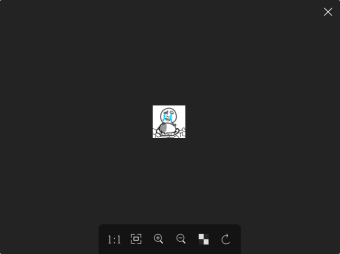
Similar to CPix and EZView, Pineapple Pictures is a user-friendly and uncomplicated image viewer tool for most people. It employs a minimalist-style interface with an opaque look, doing away with the usual visual elements that you’d find on other image-viewing software. Instead, you’ll need to mouse over the black window in order to display them—letting you have an unobstructed view of the images unless you actually need to toggle something.
The controls for the program are simple enough, as well. To view an image file, just drag and drop it onto the window. It supports popular formats such as JPG, BMP, PNG, WebP, GIFs, and the like. Once an image is displayed, left and right arrows will appear that will allow you to browse through any other image inside that same folder location. Unfortunately, the app doesn’t have a slideshow feature.
Meanwhile, the bottom toolbar lets you change the picture’s size, zoom in and out, enter full-screen mode, toggle the opacity of the transparent background, and rotate the image to 90°. In order to access more controls, you must right-click on the window. This will bring up five options: Copy Pixmap, Stay on top, Protected Mode, Configure, and Help. To close the program, simply click the X button or double-click the window—which is a default action.
Too basic in nature
All in all, Pineapple Pictures is a nice and handy little tool if you’re looking for a photo viewer that only displays the images. It has some cool features, like being able to stay on top of other programs and making use of transparent backgrounds. It doesn’t have some advanced features, however, like the ability to display a slideshow or even manually select a file via the “Browse” button. Nevertheless, this is a highly recommended multimedia program.